
Privacy and data security are core concerns when using mobile devices in enterprise settings. However, they also face unique threats because they frequently connect to external peripheral devices in dynamic, real-world environments. Peripheral devices, or peripherals, are built-in or external devices that connect to phones or other computing devices to extend their functionality, such as cameras, microphones, or USB flash drives.
For example, these endpoints can be exploited by malicious insiders or spyware to access features such as the camera, microphone, and GPS, enabling surveillance of meetings, capture of sensitive information, and data exfiltration.
As a result, securing mobile devices isn’t only about protecting data on the device itself, but also about controlling the external connections it can make. In these settings, tools like Samsung Knox HDM can help organizations manage peripheral device access with greater precision, giving IT teams more control in sensitive enterprise environments.
Table of contents:
- How malware can exploit peripheral devices
- How Samsung Knox HDM helps protect peripheral devices
- Scenarios where Samsung Knox HDM can strengthen control
- Keep your peripherals safe with Samsung Knox HDM
How malware can exploit peripheral devices

Peripheral devices can expand what mobile phones are able to do, but they can also expand the attack surface. To better understand the risks this creates, let’s look at an example of how these attacks can unfold:
- Step 1: Attackers infiltrate devices to execute malware code on the victim’s device. Infiltration can happen through peripherals such as a USB port (e.g., connecting to a malicious charger) or remotely through vulnerable network interfaces.
- Step 2: The injected malware exploits any unpatched vulnerabilities in the Android framework and the OS kernel to gain the needed privilege to bypass enterprise policy controls, such as those enforced via mobile device management (MDM)/enterprise mobility management (EMM) tools.
- Step 3: The malware can then access sensitive data stored on the device or use the device’s peripherals to track the user and covertly collect information on their activities. For example, the device’s cameras and microphones can be hijacked to watch and listen to a targeted individual’s environment, collecting valuable information without detection.
- Step 4: The malware finally transmits all collected data back to the attacker through network connections such as cellular or Wi-Fi.

Figure 1: How advanced malware works. Specifically, advanced malware escalates its privileges using OS or Android framework vulnerabilities and is able to stealthily access peripherals such as the camera and mic in the background.
Preventing these advanced threats requires more than typical OS-level controls and restrictions, because the attacks occur at a lower layer and can bypass them. Attempts to disable camera, microphone, USB, or network radios through OS-provided controls, such as airplane mode or MDM policy, may be ineffective if an attacker is able to override those controls and silently mislead the user or admin.
For example, Pegasus spyware used a rooting exploit to escalate privileges at the OS level, bypass access controls, surveil live audio, and capture camera images stealthily. Similarly, researchers demonstrated Android vulnerabilities that allowed apps to access camera, microphone, and GPS data without the required permissions. These cases demonstrate the need for protections that can secure peripheral access even when the OS is compromised.
How Samsung Knox HDM helps protect peripheral devices
Hardware Device Manager (HDM) is a Samsung-exclusive security layer that enables high-assurance control over peripheral devices. Whether for enterprises, government agencies, or privacy-focused everyday users, HDM helps support stronger hardware-level security. These controls operate below the OS, so they remain in effect even if the OS is compromised or the device is factory reset.
Based on enterprise policy, HDM can control access to:
- physical sensors (cameras, microphones)
- communication chips (cellular modems, Wi-Fi, Bluetooth, NFC)
- other peripherals (GPS, USB flash drives, speakers)
HDM leverages ARM hardware virtualization to sit in between Android and the physical peripherals, acting as a security “breaker switch” that provides direct control of peripheral access. This enterprise hardware policy can allow or deny access to specific peripherals, with settings that can automatically trigger a physical lockout if device rooting or compromise is detected.
Notably, these protections can still be enforced even if a compromise isn’t identified right away. This zero-trust approach means organizations don’t need to rely on malware detectors being perfectly accurate to maintain confidence in their deployment.
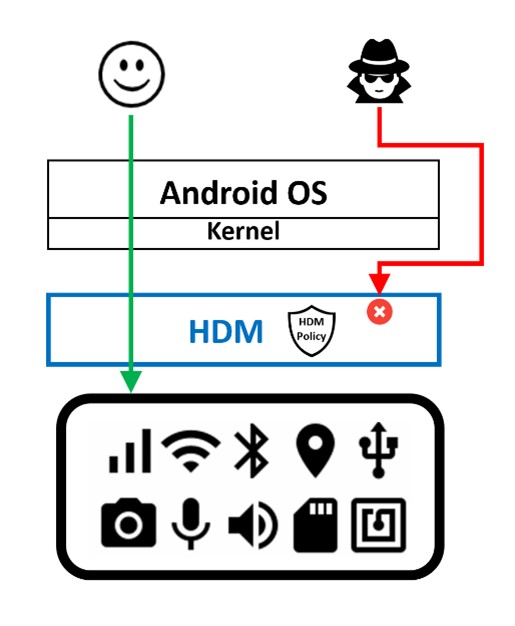
Figure 2: HDM mediates all accesses to peripherals even if an attacker bypasses Android OS access controls. HDM enforces access based on an enterprise policy stored in tamper-resistant secure storage that persists even across factory resets.
The benefits of Samsung Knox HDM
Peripheral control at this level requires more than just defining a policy. By controlling peripheral access at the hardware level, HDM offers several important security benefits:
- HDM controls are enabled before any potentially untrusted code can run. HDM starts before the OS as part of Samsung Knox’s hardware-rooted trusted boot process, which is the chain of trust that begins when the phone is powered on and ensures that each component is cryptographically validated before being loaded.
- HDM offers protection even in the face of OS compromise. HDM runs at a higher privilege than the OS by leveraging ARM’s hardware virtualization extensions, and therefore mediates and controls all accesses to peripherals, even if the Android framework and OS are completely compromised by malware.
- HDM policy is tamper-resistant and persistent across factory resets. HDM stores its enterprise policy in device secure storage that is protected from tampering and preserved even across factory flashing and resets. Even if the secure storage itself is broken by hardware attacks, HDM can apply a default protection policy.
- HDM policy updates are cryptographically protected. HDM uses cryptographic signatures and mutual authentication for policy updates. A trusted HDM server or appliance generates and signs the enterprise policy, which is verified by HDM on-device. In turn, HDM uses its own unique, hardware-backed key to prove its identity to the server and to sign HDM policy responses. This signed response protects against any attempt to forge the hardware policy state of any peripherals or radios.
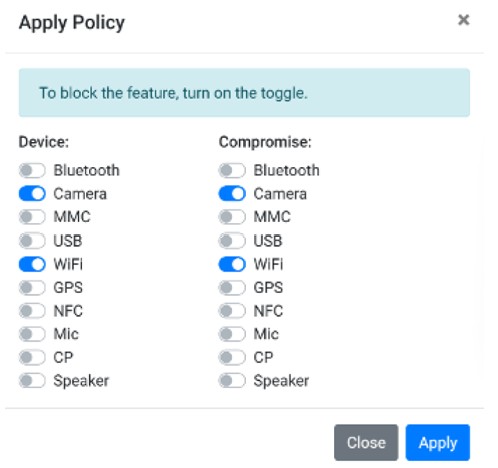
Figure 3: An enterprise policy specifies whether HDM should disable specific peripheral devices, and whether to trigger lockout of peripherals upon detecting device compromise
Key improvements in HDMv2
As of March 2026, HDMv2 introduces enhanced capabilities—now available on select device models with OneUI 8.5.
Functionality and security enhancements include:
- Off-the-shelf device compatibility: HDMv2 is available on official market binaries, thus enabling partners to use HDM on off-the-shelf devices without requiring software binary customization. Partners register with Samsung, which enables them to generate and deploy cryptographically protected HDM policies to their devices.
- Partner policy lock-in: As an additional layer of security, each HDMv2 device can receive policies from only one HDM partner solution. The policy is cryptographically bound to partner identity. Once a policy from a partner has been successfully installed, the device thereafter only accepts policies from that partner. This avoids policy conflicts or potentially hostile device takeover attempts by a different entity. Policies can also only be installed through a device-owner (DO) app.
Scenarios where Samsung Knox HDM can strengthen control
Samsung Knox HDM can support a range of use cases where tighter control over peripheral access is needed. Here are a few examples.
Scenario 1: Fixed peripheral configurations for high-security environments
Some deployments require certain peripheral functions to remain disabled at all times, rather than relying on users or software controls to manage them.
HDM supports this by allowing specific subsystems, such as GPS, microphones, and Wi-Fi, to be disabled before devices are deployed. This can be especially valuable in high-security use cases, such as during military operations, where preventing reactivation in the field helps reduce the risk of detection or compromise.
Scenario 2: Dynamic context-based peripheral access
In some environments, peripheral access may need to change based on location, context, or user activity. To help protect sensitive information or intellectual property, organizations may restrict the usage of mobile device functionality in secure campuses or other controlled areas. HDM can support this by disabling the camera or microphone before a device enters those spaces, either through external triggers or at an entry gate.
HDM can also support more flexible privacy controls in day-to-day use. For example, microphone and camera access can remain disabled by default, then be temporarily enabled only when needed for a phone call or video chat. This offers a more flexible approach to privacy, especially for device functions that can’t be physically covered or blocked.
Furthermore, it can be useful in situations where signal-blocking bags may fall short, since disabling radio functions helps prevent wireless signal leakage. Unlike those bags, this approach allows the device to remain usable while protected.
Scenario 3: Damage containment in a Zero Trust model
A core principle of Zero Trust is to assume breach, meaning enterprises must plan for the possibility that a device or system could be compromised and have measures in place to contain the breach. This makes limiting damage just as important as preventing the initial attack.
HDM supports this approach by enabling robust hardware-level disabling of peripherals such as Wi-Fi and cellular modems when a compromise is detected. This can help contain the breach and reduce the risk of enterprise data exfiltration from the affected device.
Keep your peripherals safe with Samsung Knox HDM
Peripheral devices, such as the camera, microphone, and cellular modem, are increasingly abused by malicious actors to compromise devices, to spy, and to exfiltrate data. Advanced malware exploits the operating system, thereby rendering OS-level controls ineffective.
Available on managed devices through a unified endpoint management (UEM) solution like Samsung Knox, HDM provides high-assurance, secure, and flexible controls to govern access to peripheral devices. This enables organizations to securely support a wide range of scenarios, from context-based access controls to Zero Trust strategies.
Ready to take the first step toward securing your enterprise? Register now for a 90-day free trial of Samsung Knox and experience the robust protection of HDM firsthand.


